A Timer You Can Read From Across The Room
Timedisk is a visual countdown timer built around one big shrinking disk. The wedge is the time you have left — no digits to decode, no bar to interpret, and the last tenth turns red before it runs out. Chain the steps you always forget into a routine, and keep the countdown live on your lock screen.
What it does:
- Set it with a thumb — drag around the dial or tap a preset
- Watch a disk drain, visible from the other side of the room
- Chain timers into routines that auto-advance with a chime
- Keep a live countdown on the lock screen and Dynamic Island
- Adult by default, kid mode on request — and pay once, own it
How It Works
Set it in two seconds
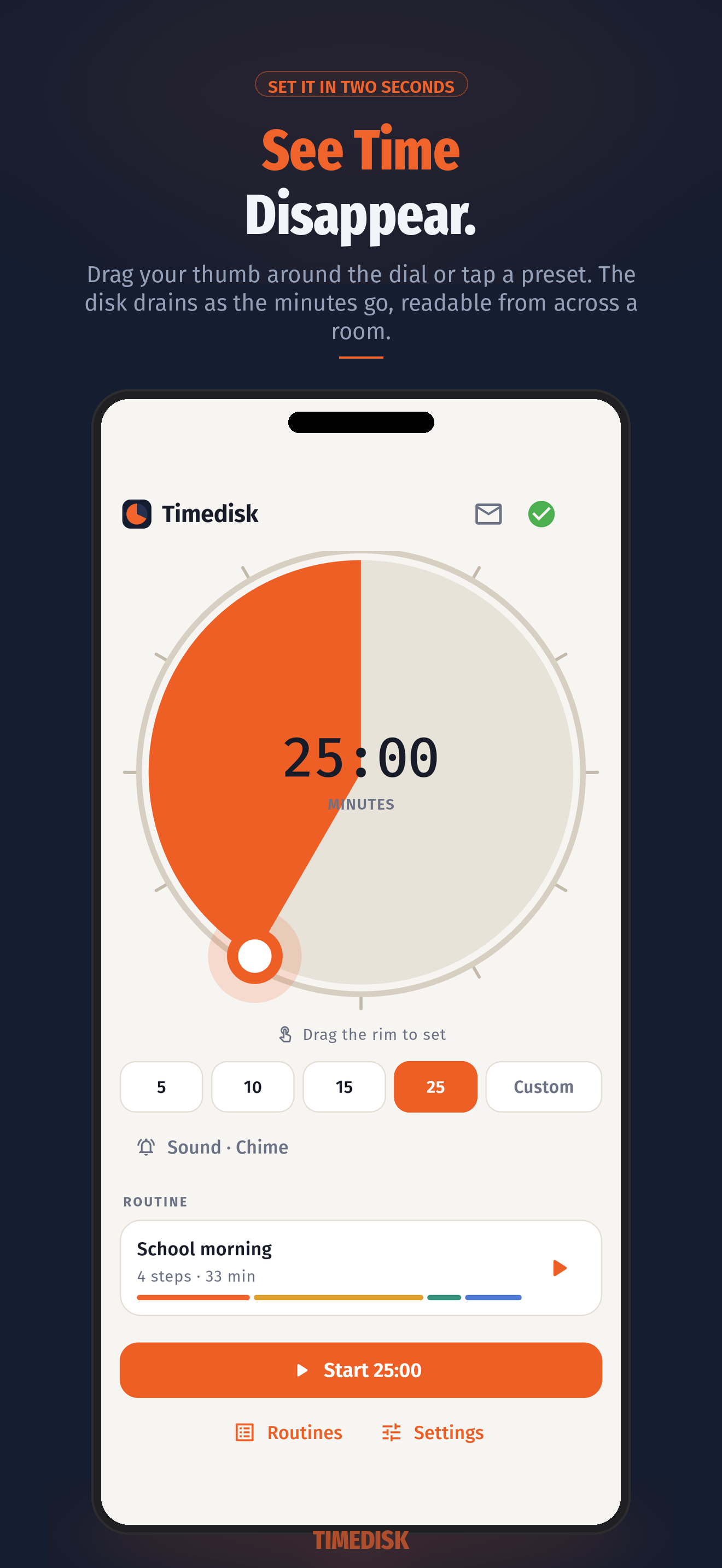
Drag your thumb around the rim to set any duration, or tap a preset chip — 5, 10, 15, 25, or your own. Your recent durations stay one tap away.
Watch it drain
A full-screen disk shrinks as the minutes go. It reads at a glance from a doorway or the back of a classroom, and the color shifts as the last tenth approaches so the ending never ambushes anyone.
Routines that run themselves
Build a named chain of steps — get dressed 10, breakfast 15, shoes and bag 5 — each with its own label and color. Steps auto-advance with a chime, and the strip along the bottom shows what's now and what's next.
Live on your lock screen
An iOS Live Activity puts the disk on the lock screen and in the Dynamic Island; on Android a foreground notification carries the progress bar and remaining time. Look without unlocking, and without trusting the app to stay open.
Adult by default, playful on request
Every visual timer on the shelf is drawn for a five-year-old. Timedisk opens calm and plain, so it belongs on a desk at work — and kid mode is one switch away for the school run, with bigger shapes and colors a child will chase. Dark theme included.
It never loses the thread
The countdown is anchored to the moment it is due to end, not to ticks that accumulate. Lock the phone, close the app, let the system kill it — reopen and the disk agrees with the lock screen exactly.
Made For Time Blindness
"Five more minutes" means nothing if you cannot feel five minutes. A shrinking disk turns an abstract number into a shape that is visibly getting smaller, which is why visual timers work so well for time blindness, for ADHD adults, for kids' transitions, for classrooms, and for anyone who loses an hour to a task that was meant to take twenty minutes.
Timedisk adds the two things that make it stick: a lock-screen countdown, so the timer keeps working when the phone goes face-down, and routines, so the morning is one chain you start instead of five timers you have to remember to set. It is a timer, not a treatment — no diagnosis, no program, no advice, just a clock you can actually see.
Timedisk Pro
The timer is free and stays free — the full disk, presets, alerts, the lock-screen countdown, and one saved routine of up to three steps. Timedisk Pro unlocks unlimited routines and steps, every theme including kid mode and dark, custom end sounds, and warning customization. The headline plan is a one-time purchase, because a timer should not be a subscription.
Lifetime
A single one-time purchase — no subscription, nothing to renew, nothing to cancel. This is the plan we lead with.
Annual
Prefer to try it across a school term first? Start with the trial and cancel anytime before it ends.
Free
Disk, presets, alerts, lock-screen countdown, and one routine of up to three steps. No card needed.
Prices come from the App Store or Google Play, vary by region, and are shown in the app at the time of purchase. Manage or cancel a subscription anytime in your device's store settings. See our Terms for full details.
What is Timedisk?
Timedisk is a visual timer app for iPhone and Android from Adelyons Software LLC. Instead of digits counting down, a large coloured disk drains as the time passes, so how much is left is legible at a glance and from a distance — the format that works for transitions, homework, classrooms, and anyone whose sense of elapsed time is unreliable.
Two things separate it from the visual timers already on the shelf. First, the countdown lives on your lock screen: an iOS Live Activity with the disk in the Dynamic Island, or an Android progress notification. Second, timers chain — a routine is a named sequence of steps that auto-advances with a chime, so a morning or a bedtime is one thing you start rather than five things you remember.
It is entirely on-device. No account, no cloud, no ads, and it works with the phone in airplane mode. The core timer is free, and Pro is a one-time purchase.
Frequently asked questions
What is a visual timer?
A visual timer shows time as a shape that shrinks rather than as digits that count down. In Timedisk a coloured disk drains as the time passes, so a glance from across the room tells you how much is left without reading, doing arithmetic, or interrupting anyone.
Does the countdown show on the lock screen?
Yes, and it is a launch feature rather than an afterthought. On iOS the disk appears as a Live Activity on the lock screen and in the Dynamic Island; on Android it runs as a foreground notification with a progress bar and the remaining time. You do not have to keep the app open to watch the timer.
What is a routine in Timedisk?
A routine is a named chain of timers that runs itself — for example Morning: get dressed 10 minutes, breakfast 15, shoes and bag 5. Each step has its own label, color, and duration, a chime plays between steps, and the progress strip shows the current step and what comes next.
Is Timedisk for kids or for adults?
Both, and it opens as an adult app. The default look is clean and plain so it belongs on a desk at work, and kid mode is one switch away when the dial is for the school run — bigger shapes, rounder corners, and colors a child will chase. There is a dark theme too.
Does the timer keep time if I close the app?
Yes. Timedisk stores the moment your timer is due to end rather than counting ticks, so closing the app, locking the phone, or having the app killed by the system does not drift the countdown. Reopen it and the disk shows the same truth as the lock screen.
Is Timedisk available on iPhone and Android?
Timedisk is built for both iOS and Android and will be available on the App Store and Google Play at launch.
How much does Timedisk cost?
The timer itself is free and stays free: the disk, presets, alerts, lock-screen countdown, and one saved routine of up to three steps. Timedisk Pro unlocks unlimited routines and steps, themes including kid mode and dark, custom end sounds, and warning customization. Pro is a one-time Lifetime purchase, or an annual plan that starts with a 7-day free trial. Prices are shown in the app at the time of purchase and may vary by region.
Does Timedisk need an account or internet?
No. There is no sign-up and no cloud. Timers, routines, and settings live on your device and the app works entirely offline; the only network use is validating a purchase through the app store.
Private — Everything Stays On Your Phone
Timedisk is built local-first. Here's exactly how it works:
- No account, no cloud, no server. You don't sign up or log in. There is no backend at all — nothing to leak and nothing to go down.
- Your routines never leave the device. Timers, routine names and steps, presets, and settings are stored only on your phone.
- Works offline. The whole app runs in airplane mode, because none of it needs a network to work.
- One billing helper. The only data that ever leaves your phone is purchase data, handled by Apple, Google, and RevenueCat to validate Timedisk Pro.
- No ads and no tracking. Timedisk contains no advertising and does not track what you time.
For complete details, see our Privacy Policy and Terms of Service.