Fill & Sign Any PDF or Form — On Your Phone
FormFill turns any paper or PDF form into a fillable, signable document. Scan a form or import a PDF, tap anywhere to add text, checkmarks and dates, drop a reusable signature, then flatten and send a clean PDF. No subscription, no account, no cloud — everything stays on your device.
What it does:
- Scan a paper form, or import a PDF or photo
- Tap anywhere to add text, checkmarks, X marks, and the date
- Draw your signature once, then reuse it on any form
- Flatten and share a clean PDF — email it or save it to Files
- 100% on-device — your documents never leave your phone
How It Works
📄 Scan or Import
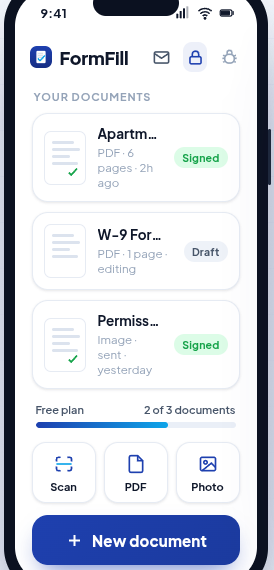
Point your camera at a paper form, or import a PDF or photo. FormFill gets it ready to fill in seconds — no desktop, no email round-trip.
⌨️ Fill Anywhere
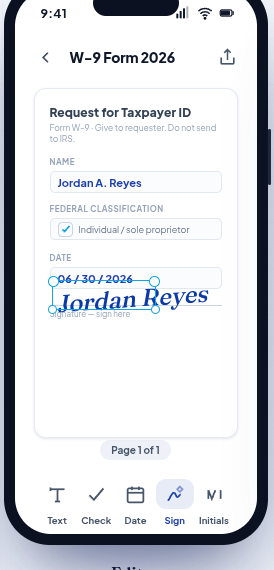
Tap anywhere on the page to add text, checkmarks, X marks, or today's date. No fiddly form fields — just type where you need to, like a pen on paper.
✍️ Sign Once, Reuse
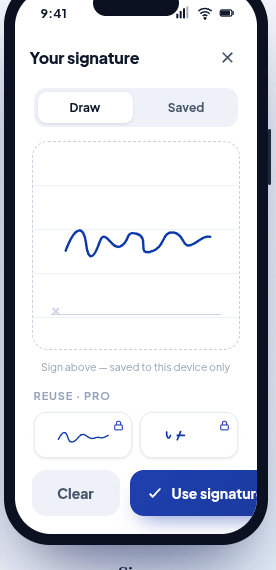
Draw your signature and initials once. Drop them onto any form in a tap, then place and resize exactly where they belong.
📤 Send a Clean PDF
Flatten your filled form into a finished PDF and share it — email it, save it to Files, or send it however you like. Your documents stay in your library.
🔒 Private by Design
No account, no login, no cloud. Every document lives only on your phone — nothing to leak, nothing to track. The only thing shared is the PDF you choose to send.
💸 No Subscription Trap
Filling out a form shouldn't cost a subscription. FormFill keeps it simple — pay once for Lifetime, or pick an annual plan with a free trial. Honest pricing, cancel anytime.
A Look Inside
FormFill Pro
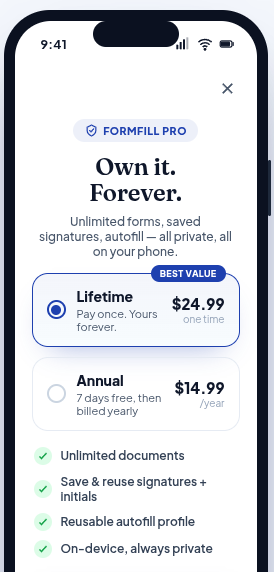
Filling and signing your first documents is free. FormFill Pro unlocks unlimited documents, saved signatures and initials, and a reusable autofill profile for one-tap form filling. Pricing is honest and store-managed — cancel anytime.
Lifetime
A single one-time purchase — no subscription, yours to keep forever.
Annual
Starts with a 7-day free trial, then billed yearly. Cancel anytime.
Free
Fill, sign, and export your first few documents — no card needed.
Prices may vary by region and are shown in the app at the time of purchase. Manage or cancel a subscription anytime in your device's App Store or Google Play subscription settings. See our Terms for full details.
What is FormFill?
FormFill is a mobile PDF form filler and signer for iOS and Android from Adelyons Software LLC. It turns any paper or PDF form into a fillable, signable document: scan a form or import a PDF, tap anywhere to add text, checkmarks and dates, drop a reusable signature, then flatten and send a clean PDF.
Everything happens on the device. There is no account, no login, and no cloud backend, so imported PDFs, scans, filled forms, and saved signatures stay on your phone. The only thing that gets shared is the finished PDF you choose to send.
Frequently asked questions
What does FormFill do?
FormFill turns any paper or PDF form into a fillable, signable document on your phone. You scan a form or import a PDF or photo, tap anywhere to add text, checkmarks, X marks, and the date, then flatten the result into a clean PDF you can send.
Is FormFill available on iPhone and Android?
Yes. FormFill is available on the App Store for iOS and on Google Play for Android.
How much does FormFill cost?
Filling and signing your first documents is free. FormFill Pro is available as a one-time Lifetime purchase at $24.99, or an annual plan at $14.99 per year that starts with a 7-day free trial. Prices may vary by region and are shown in the app at the time of purchase.
Where are my documents stored?
Only on your device. Imported PDFs, scans, filled forms, and saved signatures are stored on your phone and are never sent to a server, because FormFill has no account system and no cloud backend.
Can I fill out a paper form with FormFill?
Yes. Tap Scan to capture a paper form with your camera, or Photo to use a picture you already have. FormFill gets it ready to fill in seconds, so you do not need a desktop scanner or an email round-trip.
Do I need to create an account to use FormFill?
No. There is no sign-up and no login. Filling, signing, and exporting all happen on your device. The only things that ever leave your phone are purchase information handled by Apple, Google, and RevenueCat to validate FormFill Pro, and, only if you choose to use Invite a Friend, an anonymous referral code — never a document, a name, or an email.
Is a signature added in FormFill legally binding?
FormFill lets you add a hand-drawn signature image to a document. Whether that signature is legally binding depends on the document, the parties, and the laws of your jurisdiction, so consult a qualified professional about documents with legal significance.
What does FormFill Pro unlock?
FormFill Pro unlocks unlimited documents, saved signatures and initials, and a reusable autofill profile for one-tap form filling. A Lifetime purchase is one-time and does not renew, and the annual plan can be cancelled anytime in your App Store or Google Play subscription settings.
Private — Your Documents Stay on Your Phone
FormFill is built local-first. Here's exactly how it works:
- No account, no cloud, no server. You don't sign up or log in. There's no backend that receives your documents — nothing to leak and nothing to fail.
- Your documents never leave the device. Imported PDFs, scans, filled forms, and saved signatures are stored only on your phone.
- You share, not us. A finished PDF is created on your device and shared only if and when you choose, through your phone's normal share sheet.
- One billing helper. The only data that ever leaves your phone is purchase/subscription data, handled by Apple, Google, and RevenueCat to validate FormFill Pro. They never receive your documents.
- One optional referral code. If you use Invite a Friend (in Settings), an anonymous referral code is sent to grant the 30-day reward — never a document, a name, or an email.
For complete details, see our Privacy Policy and Terms of Service.