Snap it. It's filed. You'll be reminded.
The kitchen drawer full of receipts and warranty cards, made searchable. Photograph a receipt, a warranty card or a product label — Warranty Drawer reads the merchant, product, purchase date, price and warranty term, works out the expiry, files the item under a category and reminds you 30, 7 and 1 days before the warranty lapses.
Read on your phone, not uploaded. Only the extracted text is sent to tidy the title and choose a category; the photo is never sent to be read unless you ask, and it is uploaded only if you turn on backup & sync.
A photo is the whole job
Read on the device
Text recognition runs on your phone. The merchant, product, date, price and warranty term are pulled out and shown beside the text they were read from, so a wrong read is caught in one glance.
Filed, not typed
A short human title, a normalised merchant and a category are chosen for you — every one a suggestion you can change. When two readers disagree, the field is tinted "check this" with the other value one tap away.
Reminders that fire
Local notifications 30, 7 and 1 days before a warranty or return window ends. No server involved; nothing to break.
Find it six months later
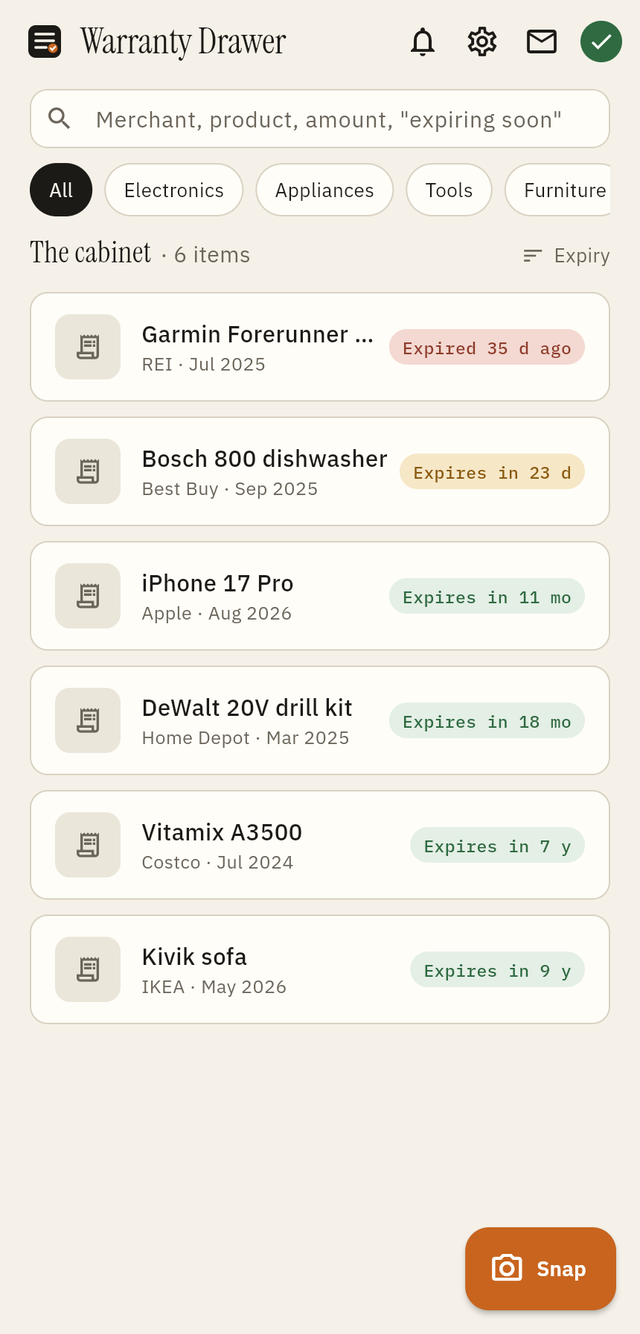
Search by merchant, product, category, amount ("300+") or "expiring". Sort by expiry, purchase date, price or merchant.
Recall alerts
Each time you open the app it downloads the public US recall list (CPSC; NHTSA for a vehicle) to the phone and compares your items there. A match shows on the cabinet and on the item with the reason — model number, brand, product words — and never as more than it is. Your items stay on the phone.
Sensible defaults
When the paper says nothing: the brand's published standard term if we have it sourced, else 12 months for electronics and appliances, 36 for tools, the 2-year statutory minimum in the EU and UK — always labelled as a default.
Your drawer stays yours
Local-first. Never held behind a login. Export everything — items, dates and every photo — as a ZIP at any time, signed in or not.
Backup you choose, three ways
Local only
- The default, forever usable
- Nothing in the cloud
- ZIP export as your backup
Guest — no account
- A full cloud copy with no email or password
- A recovery code you keep re-opens it on a new phone
- Link Google or Apple later, same drawer
Google or Apple
- Restore by signing in again
- Share one drawer with your household
- Sharing the drawer is free
Warranty Drawer+
Free
The full snap-to-file flow, reminders, search, backup, restore and household sharing. No card needed.
Yearly
Unlimited items, multiple photos per item, return windows and extended plans, the claim helper and CSV and PDF inventory exports. Household sharing is free.
Lifetime
Everything in Warranty Drawer+, yours to keep. No subscription.
Prices are shown in the app in your local currency at the time of purchase. Backup, restore and reminders are never paid features. Manage or cancel a subscription in your App Store or Google Play account.
Free tools, no app needed
Recall checker — type a brand, product and model number and check it against the public CPSC and NHTSA recall lists in your browser, with the reason for every match.
How long is the warranty on…? — manufacturers' published standard warranty terms and return windows by brand and product (Samsung washer, DeWalt drill, iPhone…), each read from the maker's own page with the date.
How to check if a product you own is recalled — the four steps, where the model number hides, and which US list covers which product.
What is Warranty Drawer?
Warranty Drawer is a warranty tracker and receipt organizer for iOS and Android. It turns a photo of a receipt, a warranty card or a product label into a filed item with a category, an expiry date and reminders — and it does the reading on your phone. It is built for the household with a drawer of receipts "just in case": the dishwasher that dies at month eleven, the drill with a three-year warranty nobody remembers, the return window that closes on Sunday.
It also builds a claim: a dated PDF with your proof of purchase, the serial number, the warranty terms and a claim letter, ready before you talk to anyone.
Frequently asked questions
What does Warranty Drawer do?
You photograph a receipt, a warranty card or a product label. The app reads the merchant, product, purchase date, price and warranty term, works out the expiry date, files the item under a category and reminds you 30, 7 and 1 days before the warranty ends. Every field is editable and a scan never blocks filing.
Does it tell me when something I own is recalled?
Yes. On app open it downloads the public US recall list (CPSC consumer products; NHTSA for a vehicle with make, model and year) to the phone and compares your filed items there. A match appears on the cabinet and on the item with what matched: a model number, or the brand plus a product word as a "possible match, check the model number". Nothing about your items is sent anywhere; turn it off in Settings if you prefer.
Does the photo of my receipt get uploaded?
Not to read it. Text recognition runs on your phone. When you're online, only the extracted text is sent to our service to tidy the title and choose a category; the photo never leaves your phone unless you explicitly tap "Read the picture instead?" for one item. The reading service stores nothing about a receipt; photos are uploaded only if you turn on backup & sync.
Does it work offline?
Yes. Snap, read, file, search, sort, remind and export all work without a connection. Items filed offline are refined the next time you open the app online, and nothing you typed is ever changed.
Do I need an account?
No. Sign-in is offered once, after your third filed item, and adds only a cloud backup, restore on a new phone and household sharing. You can sign in with Google or Apple, or back up as a guest with a recovery code you keep.
What if I lose my phone?
If you linked Google or Apple, sign in again on the new phone. If you backed up as a guest, enter your recovery code. Either way the same drawer, photos and purchases come back. A ZIP export from Settings works as a backstop, signed in or not.
Can my household share one drawer?
Yes. Share your household code from Backup & sync; anyone who enters it sees and adds the same items. Sharing is free; Warranty Drawer+ follows each person, not the household.
Is Warranty Drawer free?
The free tier files ten items with the full snap-to-file flow, reminders and backup, and no card is needed. Warranty Drawer+ adds unlimited items, multiple photos per item, return-window and extended-plan clocks, the claim helper and CSV and PDF inventory exports. Household sharing is free.
How do I delete my data?
Delete items in the app or uninstall it to remove the phone's copy. If you turned on backup & sync, Settings → Backup & sync → Delete cloud account removes the cloud copy and your account immediately; the phone's copy stays.
Privacy First — The Photo Is Read on the Phone
Here's exactly how it works:
- Read on the device. Text recognition runs on your phone, always — that is what makes capture work offline.
- Text only, when online. Only the extracted text goes to our service to tidy the title and choose a category. The photo is never sent to be read unless you explicitly tap to send one, once, for one item, and the reading service stores nothing about a receipt.
- No account required. Backup & sync is offered, never demanded — Google, Apple, or a guest backup with a recovery code. Only then are your items and photos copied to your cloud drawer.
- You own the export. The whole drawer as a ZIP, any time, signed in or not.
- One billing helper. Purchases are handled by Apple, Google and RevenueCat; they never see your drawer.
For complete details, see our Privacy Policy and Terms of Service.