Point At A Hundred-Year-Old Letter. Get A Transcript You Can Trust.
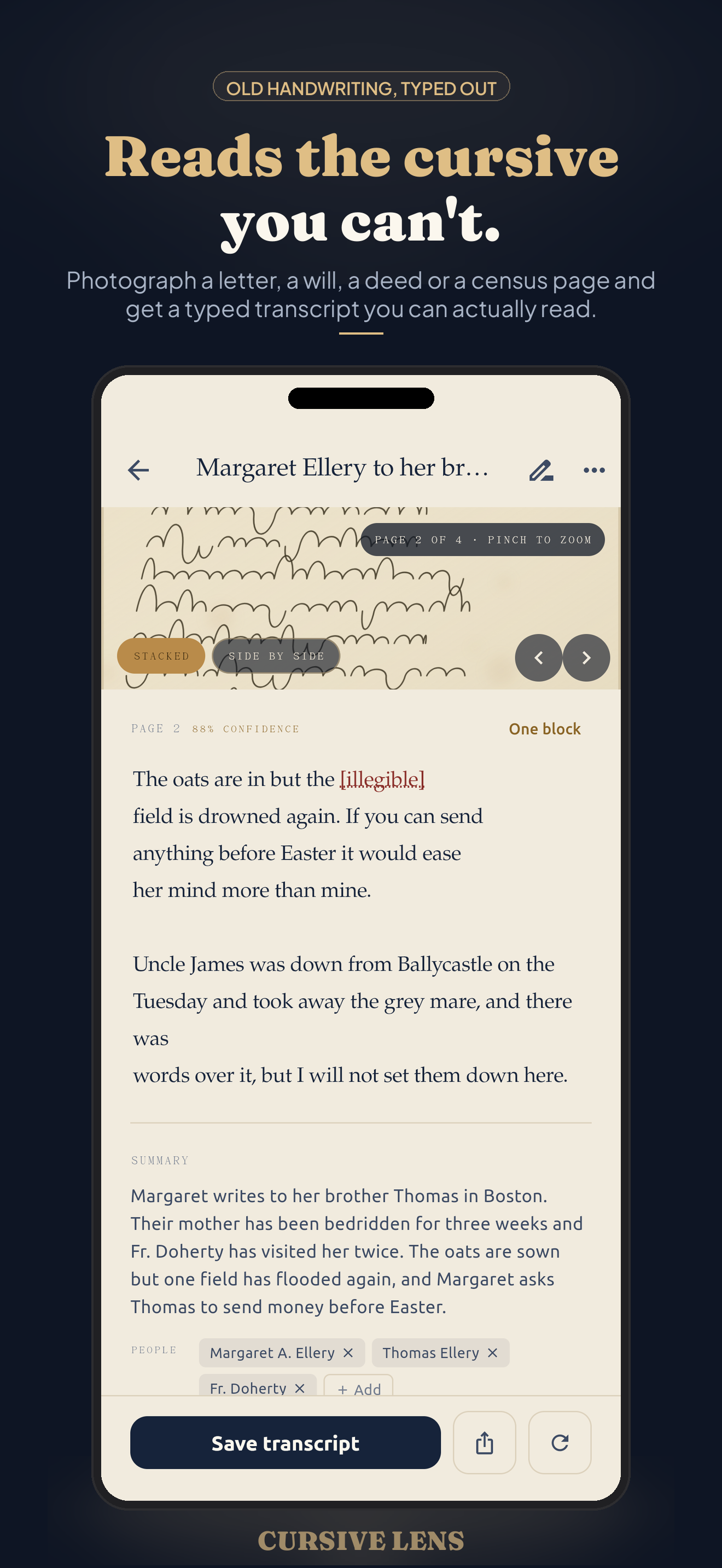
Cursive Lens is an old handwriting translator for family historians. Photograph a letter, will, deed, or census page and it types out what the page says, summarizes it in plain English, and pulls out the people, places, and dates named in it. Built for the handwriting that isn't yours — secretary hand, copperplate, faded iron-gall ink.
What it does:
- Scan with the camera, import a photo, or open a PDF
- Get a faithful transcript with original line breaks and illegible passages marked
- Read a plain-English summary of what the document actually says
- See the people, places, and dates extracted and ready to tag
- Edit anything, search across every transcript, export text or PDF
How It Works
Photograph the page
The built-in document scanner finds the edges and flattens the page. Import from your photo library or a PDF instead if the image already exists. A four-page letter stacks into one document.
Say what you're looking at
Pick the document type — letter, will, deed, census, other — and optionally the era and language. A reader who knows it is looking at 1890s copperplate makes far fewer mistakes, and so does this one.
Get the transcript
A faithful typed transcript that keeps the original line breaks and marks anything genuinely unreadable as illegible instead of guessing. The source crop for the line you are editing sits right above the text.
And the meaning
A plain-English summary tells you what the document says without deciphering every word — who wrote to whom, what was asked for, what was left to whom.
People, places, dates
Names, locations, and dates are pulled out of the page and attached to the document as editable tags, so a box of loose papers becomes a searchable set of records.
Yours to correct and keep
Every transcript is editable — fix a surname, correct a place — and the corrected version is what stays. Search across all of them, and export any document as text or as an image-plus-transcript PDF.
Built For Genealogy, Not For Your Shopping List
Handwriting apps generally exist to digitise notes you wrote yourself this week. Cursive Lens exists for the opposite problem: other people's handwriting, the older the better. A great-grandmother's letter, a will written in secretary hand, a deed with crossed lines to save paper, a census enumerator working fast at the end of a long day.
That is a different job. It needs a model that reads historical hands, a prompt that knows what a probate record looks like, an interface that shows you the ink beside the text so you can check a surname, and the discipline to mark a word illegible rather than invent a plausible one. Getting a name wrong in a family tree is worse than leaving a gap.
Cursive Lens Pro
Your first three transcriptions are free — enough to prove it on your own documents before you decide. Cursive Lens Pro removes the limit: unlimited transcriptions, multi-page documents of any length, an unlimited library, and PDF export. Pricing is store-managed and shown in the app — cancel anytime.
Annual
For working through a box, an archive, or a research project. Cancel anytime before the trial ends and you are not charged.
Monthly
Low commitment. Cancel anytime in your App Store or Google Play subscription settings.
Lifetime
For the one-archive-and-done researcher. A single one-time purchase, subject to fair use on transcriptions.
Prices come from the App Store or Google Play, vary by region, and are shown in the app at the time of purchase. Manage or cancel a subscription anytime in your device's store settings. See our Terms for full details.
What is Cursive Lens?
Cursive Lens is an app for iPhone and Android from Adelyons Software LLC that transcribes old handwritten documents. You photograph a page — a letter, a will, a deed, a census return — and it returns a typed transcript, a plain-English summary, and the people, places, and dates the document names.
It is aimed squarely at genealogy and family history. The hard part of reading old cursive is not that the writing is messy; it is that the letterforms, abbreviations, and conventions belong to another century. Cursive Lens is prompted for exactly that, and it asks you for the document type and era first because those hints materially improve the reading.
Your library lives on your phone. Transcription itself is an online step: the page image is sent to Google's Gemini model for processing and the text comes back to your device. We keep no copy on any server of ours, and there is no account to create. The Privacy Policy spells that out.
Frequently asked questions
What does Cursive Lens do?
Cursive Lens transcribes old handwriting. Photograph a letter, will, deed, census page, or postcard and it returns a faithful typed transcript with the original line breaks, anything unreadable marked as illegible, a plain-English summary of what the document says, and the people, places, and dates it names.
Can it really read old cursive?
That is what it is built for. Cursive Lens targets historical hands — secretary hand, copperplate, spencerian, faded iron-gall ink, crossed and cramped letters — rather than modern note-taking handwriting. You can tell it the document type and roughly which era and language it comes from, which materially improves the reading.
How accurate is the transcript?
Good enough to work from, not a substitute for your own eyes on a hard page. Passages that cannot be read confidently are marked illegible rather than guessed at, and every transcript is editable, so you can correct a name or a place and keep the corrected version. Treat it as a first-pass reading of a primary source, then verify anything that matters.
Are my documents kept private?
Your documents, images, and transcripts are stored only on your device, and there is no account and no cloud archive. To transcribe a page, that page's image is sent to Google's Gemini model for processing and the text comes back to your phone. We do not store your images or transcripts on any server of ours. The Privacy Policy explains this in full.
Do I need an internet connection?
Yes, for transcription. Reading historical handwriting takes a large multimodal model that cannot run on a phone, so the transcription step needs a connection. Everything else — browsing your library, reading, editing, searching, and exporting past transcripts — works offline.
Is Cursive Lens available on iPhone and Android?
Cursive Lens is built for both iOS and Android and will be available on the App Store and Google Play at launch.
How much does Cursive Lens cost?
Your first three full transcriptions are free, so you can try it on your own family documents before paying. Cursive Lens Pro then unlocks unlimited transcriptions, an unlimited library, and PDF export. Pro is offered as an annual plan that starts with a 7-day free trial, a monthly plan, or a one-time Lifetime purchase. Prices are shown in the app at the time of purchase and may vary by region.
What kinds of documents does it handle?
Letters, wills, deeds, census pages, parish and church records, diaries, ledgers, and postcards. Multi-page documents stay together as one document, so a four-page letter is transcribed and stored as a single item with a single summary.
Private — Your Archive Stays On Your Phone
Cursive Lens is local-first, with one honest exception. Here's exactly how it works:
- No account, no cloud archive. You don't sign up or log in. Your documents, page images, transcripts, and tags are stored on your device.
- Transcription is an online step. When you transcribe a page, that page's image is sent to Google's Gemini model, via Firebase AI Logic, and the transcript comes back to your phone. It is processed for that request, not added to a library of ours — we operate no server that keeps your images or transcripts.
- Nothing else is uploaded. Pages you never transcribe are never sent anywhere. Your edits, tags, titles, and searches stay on the device.
- One billing helper. Purchase and subscription data is handled by Apple, Google, and RevenueCat to validate Cursive Lens Pro. They never receive your documents.
- No ads and no tracking. Cursive Lens contains no advertising and does not track what you read or transcribe.
For complete details, see our Privacy Policy and Terms of Service.